

made for EduRise Educational Institutes only


Refraction of Light at Curved Surfaces
consider this situation
Working of Lens
Types of lenses
Convex lens
Concave lens
Lens equation
Refraction of light
some real life examples for refraction of light
when a metal ball or coin kept inside the water, then it appears to be raised..
Refraction through a glass slab...
drawing ray diagram for the refraction of light through glass slab and finding angle of deviation.
USES OF REFRACTION IN COMMUNICATION & OPTICAL FIBRES
SNELL'S law
Intro to critical angle and total internal reflection by glass slab experiment
Critical angle and total internal reflection
Sparkling of diamond
How to add social profiles to Google Knowledge Panel
Google is now featuring social profiles within a company or brand's knowledge panel. To get yours to show up you'll need to be sure you're marking it up with the proper structured data. Compatible social profiles include Facebook, Twitter, Google+, Instagram, YouTube, LinkedIn and even Myspace.
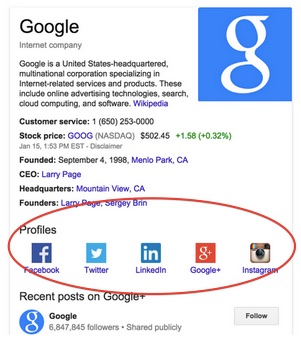
According to Google you need to pass the following requirements in order to qualify for this feature:
- Publish the proper markup on a page of your official website.
- Pages with markup can NOT be blocked by robots.txt
- Include a Person or Organization record in your markup with:
- "url" = the url of your official website.
- "sameAs" = the urls of your official social media profile pages.
Here is the basic code example Google gave for an organization to specify several social profiles:
 <script type="application/ld+json"> {
  "@context" : "http://schema.org",
  "@type" : "Organization",
  "name" : "Your Organization Name",
  "url" : "http://www.your-site.com",
  "sameAs" : [
    "http://www.facebook.com/your-profile",
    "http://www.twitter.com/yourProfile",
    "http://plus.google.com/your_profile"
  ]
} </script>
Here is a similar template for a person to specify their social profiles:
 <script type="application/ld+json"> {
  "@context" : "http://schema.org",
  "@type" : "Person",
  "name" : "your name",
  "url" : "http://www.your-site.com",
  "sameAs" : [
    "http://www.facebook.com/your-profile",
    "http://instagram.com/yourProfile",
    "http://www.linkedin.com/in/yourprofile",
    "http://plus.google.com/your_profile"
  ]
} </script>
You can simply replace the url and social profile details with your own values, and insert this code into the page that shows users these profiles normally. If the profiles visible on the page are formatted differently from the markup, that's okay. This script block can be inserted anywhere on the page — either the head or body of the page.
Subscribe to:
Posts (Atom)